06 - GAS中的Gameplay Tags
本文主要说明了UE5中Gameplay技能系统(Gameplay Ability System, GAS)中GameplayTags的相关内容。
概述
Gameplay Tag 是 UE5 提供的一套用来表达游戏语义的通用标记系统,可用于区分输入事件、能力、属性、伤害类型、Buff/Debuff、消息与数据等多种信息。一个 Gameplay Tag 使用 FGameplayTag 类型存储,其内部核心为 FName 类型的 TagName。所有 Tag 均由 Gameplay Tag Manager 统一注册和管理,并具有层级结构。多个 Tag 可以通过 FGameplayTagContainer 进行组合和查询。
在 GAS 中,主要通过实现了 IGameplayTagAssetInterface 的对象(如 Ability System Component)进行 Tag 的查询与操作。此外,其他 GAS 类型也与 Gameplay Tag 有紧密联系,例如 Gameplay Effect 可以向目标的 ASC 添加或移除 Tag,而 Gameplay Ability 则可以根据目标是否拥有某些 Tag 来决定是否能够被激活或应用。
这里将记载一些我在学习Aura项目中,GAS和Gameplay Tag相结合的一些操作用法。
常用操作
通过GE给ASC添加Gameplay Tag
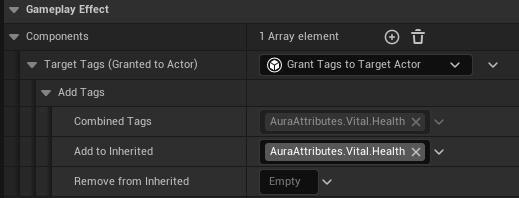
可以通过GE对目标Actor的ASC添加Gameplay Tag。这需要在非立即生效的GE中添加Grant Tags to Target Actor组件,该组件可以为目标Actor的ASC添加或移除Gameplay Tag,需要配置的项目如下:
- Add to Inherited:要添加的Gameplay Tag;
- Remove from Inherited:要移除的Gameplay Tag;
- Combined Tags:Gameplay Tag的最终计算结果(继承的Tag - 移除的Tag + 添加的Tag);
此外,对于支持堆叠的GE,添加的Tag是唯一的;对于不支持堆叠的GE,添加的Tag是可重复的。
和增强输入配合激活GA
可以通过Gameplay Tag和增强输入配合激活特定GA,Lyra似乎也是这样做的(还没学过,TODO),这里来谈谈我在Aura项目中实现的相关思路(如有更优秀的方法还请大佬们指出):
-
新建一个基于
UEnhancedInputComponent的子类UAuraInputComponent,在该子类中实现绑定按键操作的相关逻辑:AuraInputComponent.h点击展开/折叠代码
// 存储输入逻辑函数指针的结构体template <class UserClass>struct FInputActionCallbacks{// UE5提供了成员函数指针模板: TMemFunPtrType<是否是const函数, 类, 类的成员函数签名>using CallbackFuncType = TMemFunPtrType<false, UserClass, void(FGameplayTag)>::Type;CallbackFuncType OnPressed = nullptr;CallbackFuncType OnReleased = nullptr;CallbackFuncType OnHeld = nullptr;};UCLASS()class AURA_API UAuraInputComponent : public UEnhancedInputComponent{GENERATED_BODY()public:// 给UserClass类的实例ToBindObject绑定相关输入回调template <class UserClass>void BindAbilityInputAction(const UAuraInputConfig* InputConfig, UserClass* ToBindObject,const FInputActionCallbacks<UserClass>& Callbacks);};template <class UserClass>void UAuraInputComponent::BindAbilityInputAction(const UAuraInputConfig* InputConfig, UserClass* ToBindObject,const FInputActionCallbacks<UserClass>& Callbacks){// InputConfig是用于确认InputAction和它对应Gameplay Tag的DataAsset类checkf(IsValid(InputConfig), TEXT("[%hs]: InputConfig is nullptr, plz check!"), __FUNCTION__);for (const FAuraInputAction& IA : InputConfig->AbilityInputActions){if (!IsValid(IA.InputAction) || !IA.Tag.IsValid()){continue;}if (Callbacks.OnPressed){BindAction(IA.InputAction, ETriggerEvent::Started, ToBindObject, Callbacks.OnPressed, IA.Tag);}if (Callbacks.OnReleased){BindAction(IA.InputAction, ETriggerEvent::Completed, ToBindObject, Callbacks.OnReleased, IA.Tag);}if (Callbacks.OnHeld){BindAction(IA.InputAction, ETriggerEvent::Triggered, ToBindObject, Callbacks.OnHeld, IA.Tag);}}} -
在PlayerController类中实现各按键回调和相关绑定逻辑:
AuraPlayerController.cpp点击展开/折叠代码
// ...void AAuraPlayerController::SetupInputComponent(){Super::SetupInputComponent();// 绑定Input ActionUAuraInputComponent* AuraInputComponent = CastChecked<UAuraInputComponent>(InputComponent);AuraInputComponent->BindAction(IA_MoveAction, ETriggerEvent::Triggered, this, &AAuraPlayerController::Move);AuraInputComponent->BindAbilityInputAction(InputConfig, this,{&ThisClass::AbilityInputTagOnPressed,&ThisClass::AbilityInputTagOnReleased,&ThisClass::AbilityInputTagOnHeld});}void AAuraPlayerController::AbilityInputTagOnPressed(FGameplayTag InputTag){// todo...}void AAuraPlayerController::AbilityInputTagOnReleased(FGameplayTag InputTag){AuraASC->AbilityInputTagOnReleased(InputTag);}void AAuraPlayerController::AbilityInputTagOnHeld(FGameplayTag InputTag){AuraASC->AbilityInputTagOnHeld(InputTag);}// ...GA的激活逻辑和PlayerController解耦,在AbilitySystemComponent中实现:
AuraAbilitySystemComponent.cpp点击展开/折叠代码
void UAuraAbilitySystemComponent::AbilityInputTagOnHeld(const FGameplayTag& InputTag){if (!InputTag.IsValid()){return;}for (TArray<FGameplayAbilitySpec> ActivatableGASpecs = GetActivatableAbilities();FGameplayAbilitySpec& GASpec : ActivatableGASpecs){// 寻找该按键输入能触发的GAif (GASpec.DynamicAbilityTags.HasTagExact(InputTag)){// 标识该GA的输入触发为: 已按下AbilitySpecInputPressed(GASpec);// 如果该GA仍未激活, 激活它if (!GASpec.IsActive()){TryActivateAbility(GASpec.Handle);}}}}void UAuraAbilitySystemComponent::AbilityInputTagOnReleased(const FGameplayTag& InputTag){if (!InputTag.IsValid()){return;}for (TArray<FGameplayAbilitySpec> ActivatableGASpecs = GetActivatableAbilities();FGameplayAbilitySpec& GASpec : ActivatableGASpecs){if (GASpec.DynamicAbilityTags.HasTagExact(InputTag)){AbilitySpecInputReleased(GASpec);}}} -
在编辑器中补全相关逻辑/组件,例如:
- 在项目设置里的输入中修改默认增强输入组件为该子类;
- 补充相关Input Action,将其映射到Input Mapping Context中;
- 为GA设置它的Input Tag等;
上述操作将玩家输入和直接触发GA的操作解耦:对应的输入会触发对应的Gameplay Tag,之后才会根据Gameplay Tag触发对应的GA。这样做的好处就是将输入系统变得 数据驱动,可以通过不改变代码的方式修改触发GA的按键,单Tag对应多设备输入等。
参与游戏逻辑事件机制
Gameplay Tag还可参与到游戏逻辑的事件机制中,可实现通过某个Gameplay Tag触发一段游戏逻辑的效果。具体步骤如下:
-
通过
SendGameplayEventToActor函数/蓝图节点发送GameplayTag:
上图是一个专用于蒙太奇的动画通知,在某一关键帧使用该动画通知,将相关Gameplay Tag通过
SendGameplayEventToActor蓝图节点发送到动画所有者Actor中。 -
在对应Actor中调用
WaitGameplayEvent函数/蓝图节点接受Gameplay Tag: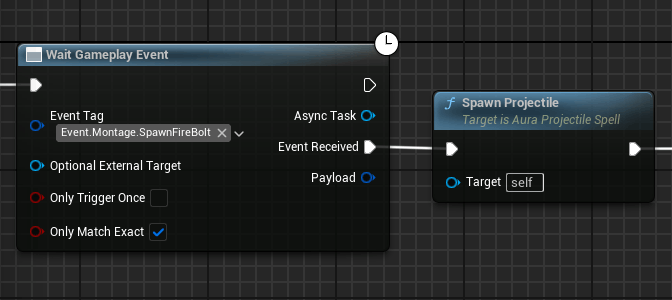
在接到步骤1动画通知的Gameplay Tag后,对应Actor将会执行
Event Received引脚后续内容。